
Building security into your CI/CD pipeline
Modern teams release software many times a day through a CI/CD pipeline, the automated process that tests and ships code. A single security review at the end cannot keep pace with that, so weaknesses slip into live systems. The answer is to place smaller security checks at each stage, where problems are cheaper and quicker to fix.
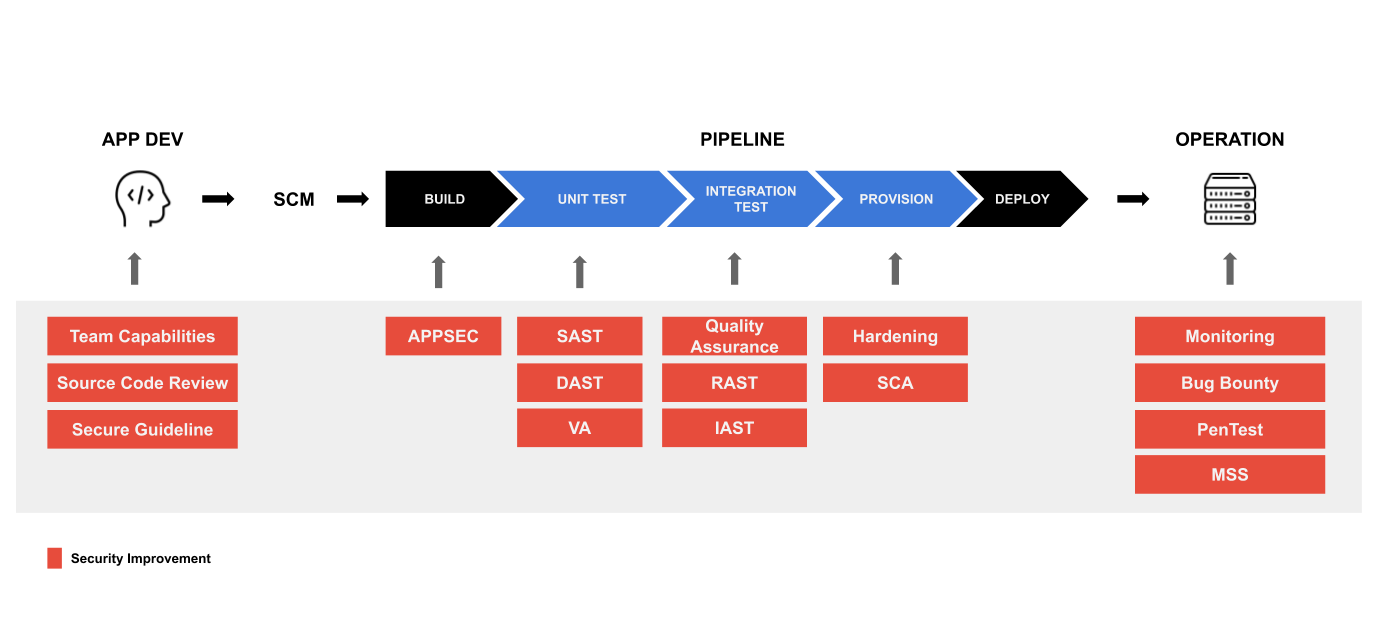
This approach is called DevSecOps. The chart above shows where each control sits. The sections below follow roughly the order in which they appear in the pipeline.
Start with the people
Tools only help if the team knows what to look for. Short, regular training helps developers recognize risky code before it ever reaches the pipeline. It costs little and prevents many common mistakes.
Choose guidelines that match your business
There are many security standards, and you do not need all of them. Pick the ones your business and regulators expect. For a bank or payment company in Indonesia, that usually means OJK (Financial Services Authority) regulations and PCI DSS, the card industry’s data security standard. Healthcare companies serving the US market follow HIPAA. Most teams also use OWASP guidance for web applications. Write the chosen rules into your internal risk policies so they are applied consistently.
Let the pipeline run the routine checks
Once the rules are clear, most checks can run automatically on every change. The common ones are:
- Static application security testing (SAST), which reads source code and flags weaknesses before the software runs.
- Dynamic application security testing (DAST), which probes the running application for problems that only appear in use.
- Dependency scanning, which checks the open-source libraries you rely on against lists of known vulnerabilities.
- Container scanning, which does the same for the container images your software is packaged in.
- Secret detection, which stops passwords and keys from being saved into the code history.
- Interactive testing (IAST) and fuzzing, which watch the application from the inside or feed it malformed input to find issues other tests miss.
- Automated remediation, which proposes a fix, runs it through your existing tests and moves it forward if they pass.
You do not need every one of these on day one. Dependency scanning and secret detection are quick to set up and a sensible place to begin. Add the others as your technology and risk profile require.
Have people test before launch
Automated checks catch known patterns. Flaws in business logic still need a human. Before a new application, environment or server goes live, have it covered by a penetration test (an authorized, controlled attack by security specialists). Some organizations add a bug bounty program, which pays outside researchers for valid findings. Others move to continuous testing that repeats on a schedule.
Watch production from day one
Put security monitoring in place before go-live. If the live system is attacked, you want to know straight away, not weeks later.
Contact us
Questions about your own pipeline are welcome through our contact form.